A wee ride out on the Motorbike

I thought I would do the equivalent of obtaining Dumbo’s feather and now have a new set of Bridgestone BT-021s on my R1100RS, so there is nothing apart from my head to fix on the bike.

There was a minor mixup from the supplier to the garage and they gave me a call on Friday to apologise that they had been sent BT-020s and had ordered the proper tyres for a Saturday delivery, so they kept the bike overnight for me so they could fit the tyres when they arrived.

As it was I had planned a day out on Saturday so I was through in Glasgow and arranged to pick up the bike on Sunday at C&J Wilsons in Uphall. After lunch at the Burrell Collection, we popped over to Hein Gericke on Great Western Road. Strangely enough hardly anything fit apart from their discount range so I now have a new textile jacket and pants at about half the price of my original HG kit. I’ve also got new boots on order, Alpinestars GPS-3 WPs (shiny shiny).

Roll on to today to run the tyres in, I picked the bike up in Uphall – checking the pattern on the front tyre which is much cooler than the BT-020, then up the M9 past Stirling and up to the little chef for a late breakfast. All was good and working on turning corners without too much panic setting in, and learning how to travel in a straight line with a rear tyre with a proper profile on it!

Then headed further up the M9 towards Perth and the Broxden roundabout where I fueled up, still a bit slow on slow (and particularly slow left handers – see my previous posts) stuff but getting there. Then the rain started. Had a few circuits around the streets of Perth – down past the Tay, past Dunkeld Road, past the bus station. All to practice slow speed lefts and rights. I need to keep practising to get rid of the feeling I am going to drop the bike, and although at first I was running a bit wide I started getting it tighter.

Then out of town and the rain was picking up, came off the M90 and decided whether or not to go through Newburgh to Cupar, but decided to head Glenfarg way – haven’t been there for years. I thought it was twistier than that – or perhaps I’m getting better. Up through there and a right turn and through Milnathort. What a surprise it was to see all of the house building work in the area. Then on through Kinross and Cowdenbeath, old stomping grounds and I worked there in my summer holidays from Fife College. Rain was getting heavier and heavier, so I chose to head back to the M90 through Crossgates and joined at Halbeath. Then a pretty nondescript ride back via the M8 to Livingston.

A reminder for wet riding though – a small tip is to remember to tuck your gloves under your waterproof kit. All of my stuff has the membranes and keeps me dry, but today all of the water was running off my jacket into the cuffs of my gloves. I swear water ran out when I lifted my arms at the end of my journey. I should have tucked them in at the petrol stop at Broxden rather than leave them, and I would have had dry gloves. All my stuff is dripping round the house now
Motorbike Tyres

The bike is in getting a new pair of tyres, the front is getting a bit near the wear indicators for comfort and the rear is quite squared off. What happens over time is that the round profile of a rear motorcycle tyre gets worn off as you ride upright most of the time. After a while this makes it harder to steer as you go over the new square edge.

I’ve decided to go for the new Bridgestone Battlax sport touring tyres the BT-021s front and back. The bike got a pair of their predecessors over 2 years ago and they have been fine for me. The bike was booked in to get the wheels changed with the new tyres but apparently the garage supplier sent BT-020s, so they have a Saturday order in to try and get the bike back to me tomorrow.

There is blurb etc about what they’ve done to develop the tyres, but the main change I can see is that the tread pattern on the front looks more funky.

Monitoring my ISP Stats – ADSL2+ fastpath 3dB profile

I’m beginning to play with this less as I settle on the highest throughput I can drag out of this old copper connecting me to the BT exchange a couple of miles away. What I will try to do in the coming days is match the time I run a speedtest to the stats on the router, the sets below are out of sync by about 15 hours.

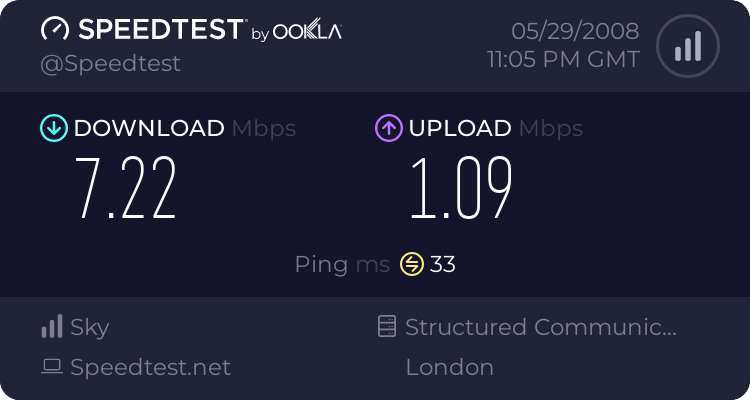
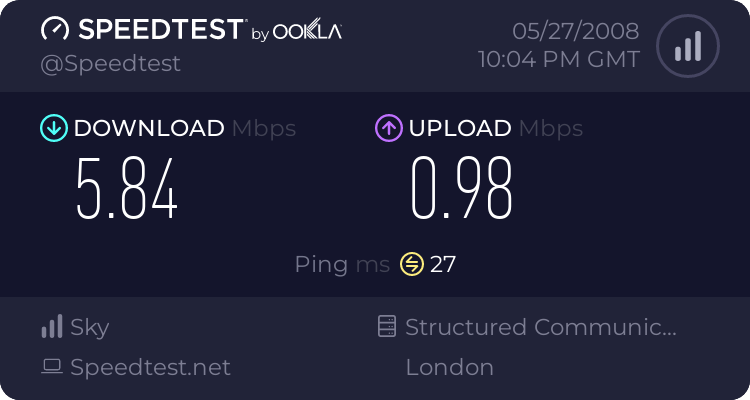
Speedtest latest says (picked one of the best from the recent goes):

What is good is that you can see the drop in ping of around 10ms as a result of the removal of interleaving for fastpath. It doesn’t make much difference to me at the moment, but the gamers like it.

Simple stats from the router go like at the moment:

ADSL Link Downstream Upstream
Connection Speed 8427 kbps 1308 kbps
Line Attenuation 46.0 db 23.8 db
Noise Margin 4.1 db 3.3 db

Be broadband have dropped the connection profile to 3dB which is having an impact on errors, but my long line appears to be generally ok and I am watching the more detailed stats every so many days.

Planning website for travelling in Edinburgh on foot

Mental title that, I was trying to come up with a short, snappy title to point at a website that shows you the best route for walking between two places in Edinburgh.

Walkit.com is great for route planning when you aren’t using public transport or a car. Google maps are fine if you are sticking to the roads, and traveline scotland is great for public transport, walkit fills the gap for a small number of cities in the uk.

I’d decided I’d walk to Ocean terminal from the office for some exercise, and the directions were great for making sure I got there and back in the shortest distance.

Monitoring my ISP Stats – ADSL2+ fastpath

As I was getting good error stats on my long wire from the exchange, I asked to get interleaving switched off on my line – i.e. fastpath. So with nothing else apart from standard ADSL2+ and fastpath I get:

And I get the following summary from my Netgear DG834PN

ADSL Link Downstream Upstream
Connection Speed 6100 kbps 1157 kbps
Line Attenuation 48.0 db 24.7 db
Noise Margin 6.1 db 6.4 db

Assuming things stay stable (based on the advanced stats) I will go for a lower noise margin profile.

Monitoring my ISP Stats – playing around

I tried to make myself not do it, but I’ve spent the last week playing around with settings on my router and configuration profile settings with my new ISP to wring the most I can out of my internet link.

The fastest I have managed so far is shown here:

The sad thing is is that I’ve been playing with settings so much that I can’t remember exactly what the settings are that produced that result. That said though, the one thing I am sure of is that I have now switched to the Be Unlimited (or Be Home) package as the distance I am from my BT Exchange means that I can’t get the full benefit of the more expensive package, so I’ve downgraded so that I get the same speed for £4 less a month.

To get improved settings I’ve been evaluating what is called fastpath, or interleaving removal. I was reminded reading a post that ADSL technology originated in cable tv over copper, so some of the technologies (like interleaving) are really targeted at video delivery. Leaving TCP/IP to deal with error correction improves latency.

The other thing I have been playing with is signal to noise ratio margin, or at least I think that is what it is. Using a downloaded tool to talk to my router and make it run closer to the wind on this margin ups my speeds to what you see above.

MORE SPEED ! 🙂

Monitoring my ISP Stats – Demon FUP Cap in action

Had enough so kicked a couple of bittorrent downloads into action and crashed against my 60Gb limit for the rolling 30 days, so I’m now capped to 128k during the day – a slight difference in speed:

Although 128k is the figure Demon quote, you get an illustration above of the congestion on these speed tester sites. Either that or the kids and my proxy server are using bandwidth.

Line stats are much the same as before:

ADSL Link Downstream Upstream
Connection Speed 5856 kbps 448 kbps
Line Attenuation 42.0 db 22.0 db
Noise Margin 9.4 db 22.0 db

Me and networks sometimes don’t get on – wifi channels

Well, a few hours after that post about changing wifi channel numbers and I have learned a little more than I expected about WiFi configuration. Turns out that changing the channel number made a big difference to a particular machine on my network, my desktop PC.

The other machines were happy following the wifi around the different channels, but my Dell 5000 (with exactly the same card and drivers as the old Dell 4100) would only work on Channels 1,7,8,9,10,11,12 and 13. As you can guess I was working my way through the channels in sequential order and that big gap at the top lead to all sorts of changes by me to try and trace the problem.

Of course the engineer side of me should have said “The only thing that has changed is the channel”, but I was in there rebooting routers and fixing wep keys. Then I discovered a post about channel powers and worked through the options – that was the issue.

But what was really confusing was that everything else was happy reconnecting, just not the machine I was using. Strange. So I’m sticking to channel 7, which has the best connection speed.

WiFi Survey

While I’m on the topic of networks and the like, I have been reading over the Be Unlimited user forums and someone mentioned clashing wifi channels. I’d thought I was ok as my router does rangemax stuff to adjust and frankly throughput has been fine.

It got me to check though, as I’ve seen the problem at work when our wifi channels clash with wifi networks in the building and houses around us. I had a look in windows xp but it didn’t tell me much about the other wifi network it could see. So I turned back to an old wardriving application I had a great amount of fun with in the past. It is called WiFiFoFum and it runs on my Orange SPV M600, using its built in wifi to do its thing. It lists all networks it can see around – including those that are trying to hide their SSIDs. It logs results to xml files that you can play around with. The real fun bit is when I hook up my bluetooth GPS receiver and it adds latitude and longtitude to the information. I once left this setup running in the car and plotted the results on google maps – cue one mapped list of open wifi between the office and home!

This flushed out an access point running without SSID on the same channel as my setup, plus the other two networks I usually see from home. Time to change myself from channel 11 to one that isn’t used by the other guys.

Monitoring my ISP Stats

I mentioned previously that I’m switching from Demon Internet to Be Unlimited. Speed claims are great, but it is really the unlimited aspect I am going for. With more folk on my network and me playing with new toys, there will be a risk in the future that I would hit Demon Internet’s Fair Usage Policy limit again and I can’t be bothered network shaping.

Anyway, in the last few days I have been monitoring the stats on my Demon connection so that I can get a comparison after the switch. I’ve been given Tuesday 20th May as the activation date, though not a time so that will prove interesting. Firstly for fun, I include a result from Speedtest – an online speed checker. I’m more interested in the change, rather than the actual figure. I try a few servers as the nominal nearest isn’t alway what I get the best result from. The first result is against the Maidenhead server, which gives the best ping.

The second is from the Paris Server, which gives a better download but longer ping.

And finally some of the stats on my line with Demon Internet:

ADSL Link Downstream Upstream
Connection Speed 6624 kbps 448 kbps
Line Attenuation 42.0 db 22.0 db
Noise Margin 6.9 db 22.0 db

From what I read on forums the Line Attenuation makes a difference to the potential speeds in DSL implementations, what I found interesting is that the distance to exchange using an online calculator puts me at around 3km from it in cabling terms, which makes a lot of sense. The BT Exchange is between our and the next villages, and we have a tributory of the river Almond between those too, which will dictate the routing somewhat.